Personal project
2023
DuoLearn: Building hybrid learning tools that connect classroom and online students in one simple experience

INTRODUCTION
Hybrid learning lets students join a class either in person or remotely. It gives people flexibility, but it also creates a communication gap. Students in the room can talk freely, read body language, and get the moderator's attention easily. Remote students often struggle to be heard, miss side conversations, and feel left out of discussions. The moderator has to manage both groups at once, which makes it hard to give everyone equal attention.
UX RESERACH
Research Approach
As a team, we planned our research in three stages: surveys to spot broad patterns, interviews to understand the reasons behind them, and usability testing to check our design solutions with real users.
User Surveys
I designed a survey to learn how people feel about hybrid learning: what works for them, what frustrates them, and how they experience communication in class. We received responses from 20 participants. Most of them were students at undergraduate, graduate, and PhD levels
The survey helped us find common themes across participants. It also showed us which topics needed a closer look, and we used those to build the questions for our interviews.

Remote Students – Getting Questions Answered
Remote students usually type their questions in the Zoom chat. Teachers are focused on the room in front of them, so these questions often go unnoticed and unanswered.
Remote Students – Feeling Alone During Breaks
In long classes (around 4 hours), there are breaks between activities. In-person students chat with each other, but remote students are left alone on the call, just waiting for the teacher to come back.
Remote & In-Person Students – Little Connection Between Groups
Remote and in-person students barely interact during class activities or group projects. The two groups end up working separately instead of as one class.
In-Class Audio – Echo from Open Microphones
Many in-person students also join the Zoom call on their laptops.
Each of us first worked on our own, sketching several concepts based on what we learned from the surveys and interviews. Every concept was a possible way to solve one or more of the pain points we had found.
We then came together, compared our ideas, and combined the strongest parts of each. This gave us one clear direction, which we turned into a storyboard showing how a user would experience Duolearn in a real hybrid class.


Lo-Fi Prototyping & Usability Testing


What We Learned from Usability Testing
Students wanted to ask questions without their name attached. Many felt shy about having their name shown next to their question in front of the class.
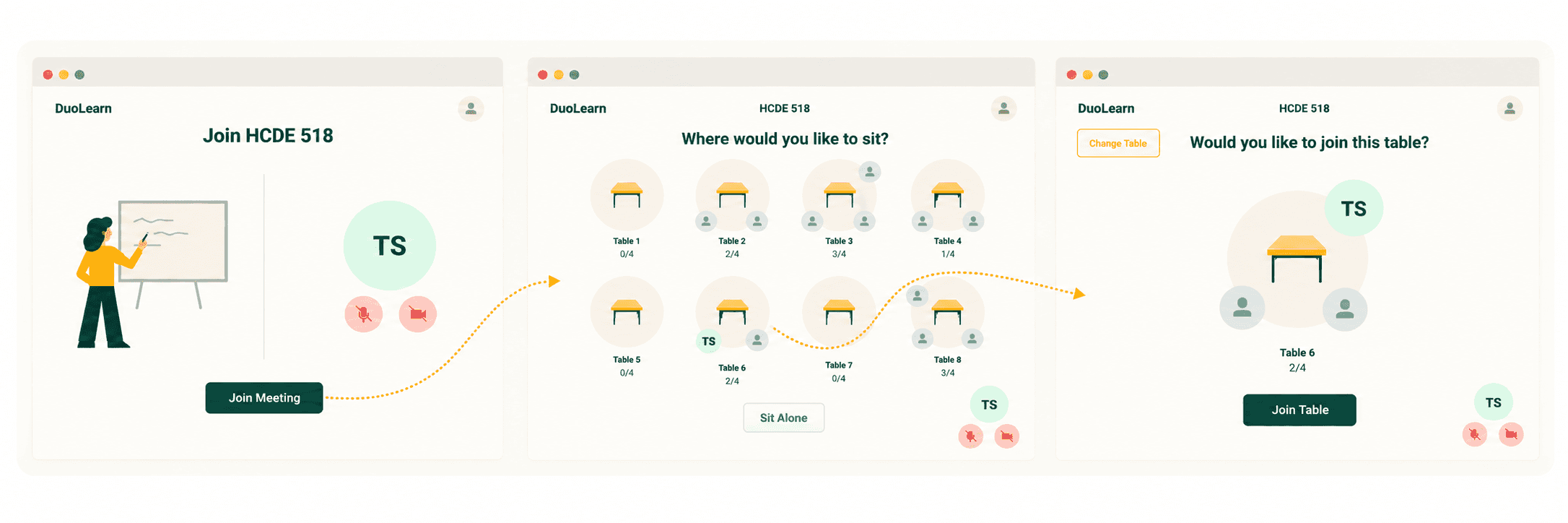
What We Learned from Usability Testing
Joining a table took too many steps. Participants wanted to sit at a table more quickly. They found some screens in the flow unnecessary and asked us to remove them so they could join in one simple step.

What We Learned from Usability Testing
A few participants wanted to see the history and archive questions that were asked in the class.
Using more than one research method
We used surveys, interviews, and observation, where we quietly watched real hybrid classes. Each method showed us something different: surveys gave us numbers, interviews gave us the reasons behind them, and observation confirmed what we had heard. Together, they gave us much more confidence in our design decisions.Communication is key
We were a team of 4, each with different skills. We split the work across research and design, and checked in often through Zoom calls, Slack, and in-person meetings. These regular check-ins helped us review our progress, question our choices, and stay aligned as a team.Going back to the insights
Whenever we got stuck or disagreed as a team, we went back to our interview findings and personas. Real user quotes and goals helped us settle debates and choose the direction that served users best, instead of relying on personal opinions.

